Search Docs
Accessibility
Allowances Module
Automated Deductions
Company
Department
Employees
Employee Payrise
Employee Classes
Employee Contracts
Employee rates
Input Wages
Check Wages
Leave
OCM (other credits multiple)
ODM (other deductions multiple)
Reminders
Wage Batches
Re-employing Employees
Re-employing employees restores the employee' entire wage history.
Re-employing Procedure
  1. Click employees
  2. Click employees
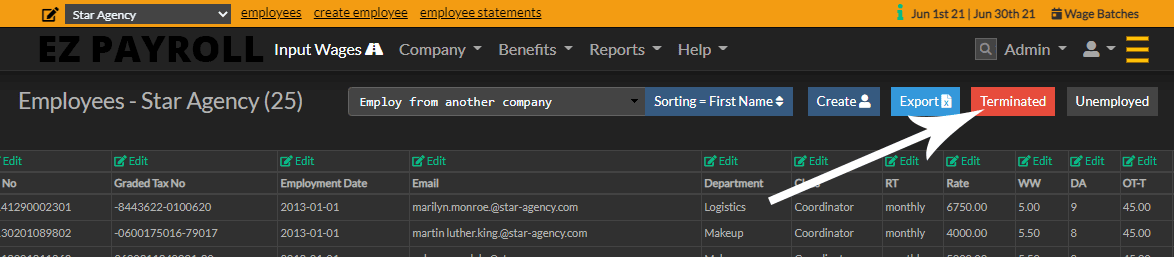
  3. Click the red button "Terminated"
  4. Click the terminated button
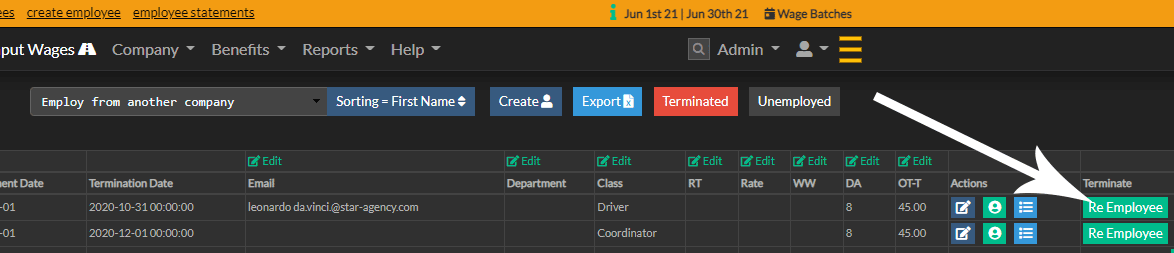
  5. Click the green button next to the employee you want to re-employ
  6. Click the Re-Employ button
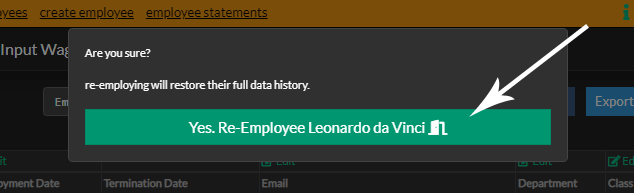
  7. Finally in the popup, click "Yes. Re-Employ"

  8. Click the Re-Employ button

Ready to eliminate payroll risk? Finalize wages in just 2 steps.

Stop dreading payday. Our unique system combines in-place editing with an unmatched, pre-commitment review screen, giving you total confidence and unmatched speed.