Search Docs
Accessibility
Allowances Module
Automated Deductions
Company
Department
Employees
Employee Payrise
Employee Classes
Employee Contracts
Employee rates
Input Wages
Check Wages
Leave
OCM (other credits multiple)
ODM (other deductions multiple)
Reminders
Wage Batches
Creating Allowance Labels
Creating a label is the first step before actually giving an allowance to an employee. Labels will be seen on wage slips and reports
Procedure
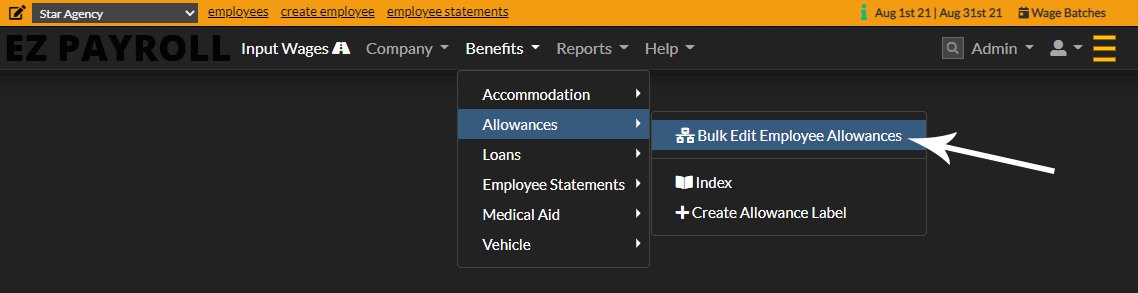
  1. From the main menu click Benefits > Allowances > Create Allowance Label
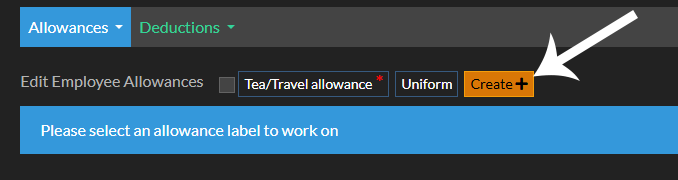
  2. Click the Bulk Edit Employee Allowances button
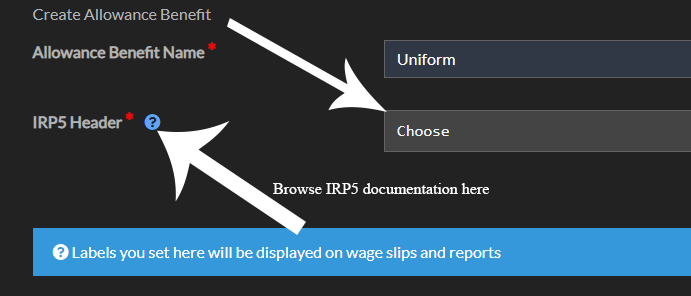
  3. Give your label a name. Remember to make it relevant for both your reports and your employees wage slip.
  4. Click the Bulk Edit Employee Allowances button
  5. Choose IRP5 Header here to access the complete documentation regarding the IRP5. It is crucial to thoroughly review the documentation if you do not fully understand this section, as it provides essential details for accurate implementation and compliance.
  6. Choose IRP5 Header
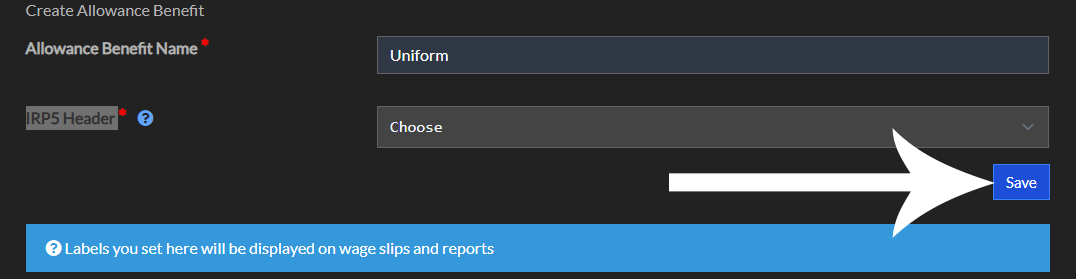
  7. Click Save
  8. Choose IRP5 Header

Ready to eliminate payroll risk? Finalize wages in just 2 steps.

Stop dreading payday. Our unique system combines in-place editing with an unmatched, pre-commitment review screen, giving you total confidence and unmatched speed.